
Conversion Tracking
Conversion tracking links ad clicks to downstream business results — sign-ups, orders, payments — so you can measure the real ROI of each campaign, creative, and zone. This page is for advertisers: it explains the trade-offs of the three reporting methods, the attribution principle, and the console setup flow. For integration code, see Conversion Tracking SDK and S2S Postback.
Comparing the three reporting methods
| Method | Where it's deployed | Best for | Loss resistance | Integration cost |
|---|---|---|---|---|
| Pixel | Embed a pixel URL on the conversion page | Simple landing/form success pages | Fair (browser-dependent) | Lowest |
| JS SDK | Include JS on the page and call the conversion API | Web pages needing custom conversion value/event name | Fair (browser-dependent) | Low |
| S2S Postback | Your server calls back to ADBNK | In-app purchases, post-risk-check finance confirmation, tamper-resistant scenarios | Strongest (browser-independent) | Medium |
How to choose
- Just want to quickly verify whether conversions happen → Pixel.
- Web conversions needing order amount and conversion type reported → JS SDK.
- Conversion happens server-side, or the client environment is untrusted (high fraud risk, sensitive amounts) → S2S Postback, the most reliable method.
Attribution principle: click_id and ADID
Whether a conversion is credited to the right ad depends on whether the attribution identifier carries all the way from click to conversion.
| Identifier | Source | Purpose |
|---|---|---|
| click_id | Generated by the platform when the user clicks the ad; put the {click_id} macro in your landing-page URL and the platform replaces it with the real value on redirect | The primary key for web attribution, matching a conversion back to that specific click |
| ADID | Device advertising ID (e.g. IDFA/GAID) | Cross-session attribution in app scenarios |
- Web flow: the user clicks the ad → the landing-page URL automatically carries
adbnk_click_id(you can also put the{click_id}macro into your own parameter, e.g.https://example.com/?cid={click_id}) → you pass thisclick_idback at conversion (Pixel param / JS SDK / S2S), and the platform attributes accordingly. - App flow: use the device ADID as the attribution anchor, with S2S postback for the conversion.
Always pass through click_id
In web scenarios, if click_id is lost during landing-page redirects, the conversion cannot be attributed to the click. Make sure click_id is fully preserved from ad landing to the final conversion page (e.g. stored in a cookie / session / hidden form field) and passed back when reporting the conversion.
Configure conversions in the console
- Create a conversion type: create a conversion in the advertiser console (e.g. "sign-up", "order", "payment") and get its reporting credential/pixel URL.
- Choose a reporting method: pick Pixel / JS SDK / S2S (or a combination) per the comparison above.
- Deploy the reporting:
- Pixel: put the pixel URL on the conversion success page.
- JS SDK: include the SDK on the page and call conversion reporting at conversion time (optionally with conversion value and type), see Conversion Tracking SDK.
- S2S: on your server, after confirming the conversion, post back
click_id/ADIDto ADBNK, see S2S Postback.
- Pass back the attribution identifier: whichever method, carry back the
click_id(or the app'sADID) obtained at landing. - Verify: make a real click → conversion and confirm the console shows the conversion correctly attributed to the campaign/creative.
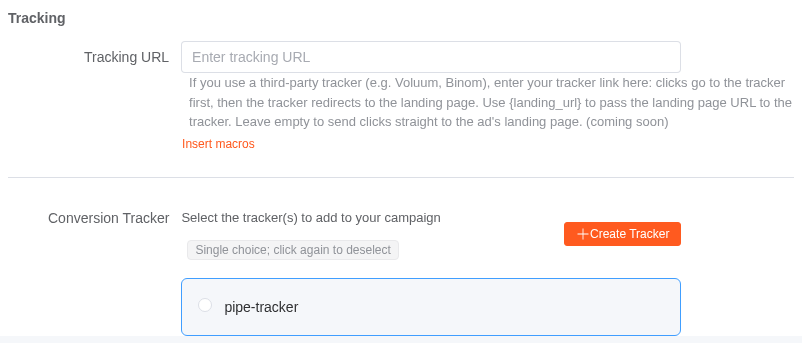
Trackers are bound to a campaign under Advanced settings → Tracking on the new-campaign page (the Tracking step when editing). The same place holds the tracking URL, where you can interpolate the supported macros:
Attribution & de-duplication
- De-duplication: Repeated postbacks for the same
click_idare counted once, so retries are safe. - Attribution window: configured on the tracker; see your console for the value.
Conversions also go through anti-fraud
Conversion events are subject to risk control too. Clicks/conversions judged as invalid traffic don't count toward billable data — you won't pay for invalid conversions. See Anti-Fraud.