
Targeting & Bidding
On every ad request, ADBNK's ad engine evaluates the targeting rules of each candidate campaign, then ranks the creatives that pass by eCPM. This page covers the supported targeting dimensions, include vs. exclude zones, per-dimension bid adjustments (±%), and pricing models.
Targeting overview
A campaign is only considered for a request when the visitor matches every dimension you've configured; a campaign that fails any one of them drops out of that request.
Empty targeting = no restriction
Leaving any dimension empty means no restriction on that dimension — everything passes. Filtering only happens when a value is explicitly configured.
Supported targeting dimensions
| Dimension | Values | Description |
|---|---|---|
| Geo | Country / region | Serve only when the visitor's location matches |
| Postal code | Comma-separated codes (prefixes) | Prefix matching, e.g. 90 matches 90210 |
| Device | PC / Mobile / Tablet | The visitor's device type |
| OS | Windows / macOS / iOS / Android / Linux / Other | The visitor's operating system |
| Browser | Chrome / Edge / Firefox / Safari / IE / Other | The visitor's browser |
| Daypart | Hours 0–23 | The hours of the day to serve in |
| Weekday | Monday – Sunday | The days of the week to serve on |
| Site category / content / media type | Category and sub-category, content tags, website / app / Telegram Mini App | Which kinds of sites and apps your ads appear on |
| Retargeting audiences | Your own visitor lists | Serve only to people already on the list |
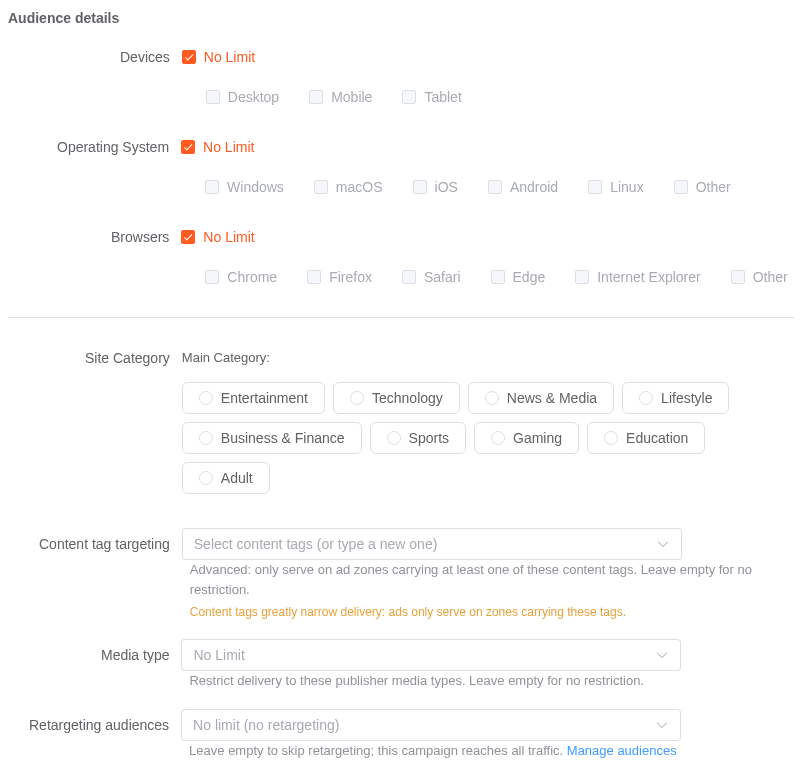
Every dimension is set in the new-campaign page: country is in the main form, the rest are under Advanced settings → Audience details and Schedule & frequency. Each one starts at No Limit; pick individual values to narrow delivery.
Geo and postal code are best-effort
Geo and postal-code targeting are best-effort. Postal-code targeting is available for a limited set of countries; the form shows the accepted format once you pick one.
Site category and content targeting
Beyond the basic dimensions, you can target by site category (a primary category, optionally narrowed to sub-categories), content tags, and media type (website / app / Telegram Mini App). Publishers' sites are categorized when they join, so your ads follow the category of the sites they appear on.
Campaigns that were set to an older media type (such as "Mini Program (legacy)") keep it until you change the media type setting; the campaign page shows a grey note when that applies.
Media type over the API
The campaign field is target_media_types, an array of WEB, APP and TELEGRAM (upper case).
- Leave the field out to keep the current setting. Send
[],nullor""to clear it (no limit). - Otherwise send a non-empty array. Any value other than
WEB,APPorTELEGRAMreturnserror.campaign.invalid_media_type, with one exception: an older value (such as "Mini Program (legacy)") that the campaign already has. Include it in the array to keep it; if the array leaves it out, it is removed. An older value can't be added to a campaign that doesn't already have it. - The array must contain at least one of
WEB,APPorTELEGRAM. An array with only older values returnserror.campaign.media_type_legacy_only; to remove the limit, send[]instead.
Include zones vs. exclude zones
Targeting supports both "include" (serve only) and "exclude" (never serve) configs:
| Type | Effect |
|---|---|
| Target geo | Serve only in these countries/regions |
| Target postal codes | Serve only in these postal codes (prefixes) |
| Exclude content tags | Never serve on zones hitting the excluded tags |
| Site/zone blacklist | Specified sites or zones never participate in this campaign — see Blacklists |
Include vs. exclude priority
Exclusion rules (excluded tags, blacklist) take priority over inclusion rules: as long as any exclusion is hit, the zone is dropped even if it meets all serving conditions.
Per-dimension bid adjustments (±%)
Bid adjustments let you pay more for traffic that converts and less for traffic that doesn't, without running a separate campaign for each segment. You set them on the new-campaign page under Advanced settings → Schedule & frequency → Bid adjustments (optional).
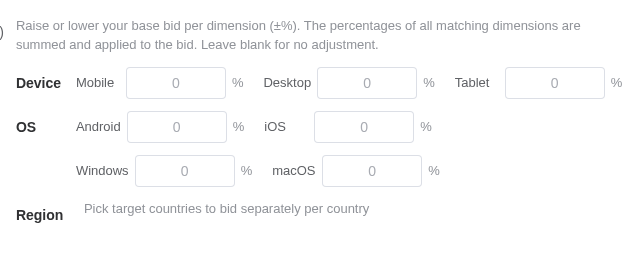
There are three groups, each a percentage input:
| Group | Rows available | Notes |
|---|---|---|
| Device | Mobile, Desktop, Tablet | Always shown |
| OS | Android, iOS, Windows, macOS | Always shown |
| Region | One row per country you selected as a target country | Empty until you pick target countries |
Each input accepts -90% to +500%, in steps of 5. Leave a field blank (or 0) for no adjustment on that value — blanks are dropped on save, so an untouched form stores nothing at all.
Region rows come from your targeting
The Region group only lists the target countries you already selected. If you haven't picked any countries, the group shows a hint instead of inputs — pick your target countries first, then come back to bid per country.
How the adjustment is applied
Each ad request carries a device, a country and an OS, and ADBNK sums every percentage that matches:
effective bid = base bid × (1 + Σ matched percentages / 100)With a base bid of $0.50 and adjustments of Mobile +20, US +15, Android -5, a request from a US Android phone matches all three: +20 + 15 - 5 = +30%, so the effective bid is $0.50 × 1.30 = $0.65.
Things worth knowing
- Matched percentages are summed, not multiplied dimension by dimension.
- The factor is floored at zero, so a heavily negative stack can drive the effective bid to
0but never negative. - The effective bid is what enters the auction (after conversion to eCPM), so an adjustment changes how often you win, not just what you pay.
- Values are clamped server-side to the same
[-90, +500]range, so an out-of-range value sent over the API is trimmed rather than rejected.
Setting adjustments over the API
The console writes these into a bid_adjustments object on the campaign. If you're integrating directly rather than using the console, see bid_adjustments in the Advertiser API for the JSON shape.
Auction ranking and clearing price
A CPC bid and a CPM bid aren't comparable as raw numbers — $2.00 per thousand impressions and $1.00 per click are different units. So before ranking, every candidate's bid is converted into eCPM (expected revenue per thousand impressions), the single currency the auction uses.
- Floor first. A zone's floor price is a hard filter: candidates below it don't take part. If nobody clears the floor, the zone serves no ad on that request.
- Ranked by eCPM. Candidates compete on eCPM — a higher eCPM gives you a better chance of winning the impression.
- Second price. The winner pays a clearing price set by the next-best competition, never below the floor and never above its own bid.
- Charged in your unit. The clearing price is converted back into your billing unit — per click for CPC, per thousand impressions for CPM — so you are never charged more than you bid.
Bid adjustments feed into this
The effective bid from the section above is what gets converted to eCPM. Raising a bid for mobile doesn't just raise your price — it raises the eCPM you enter the auction with, and so how often you win.
Pricing models
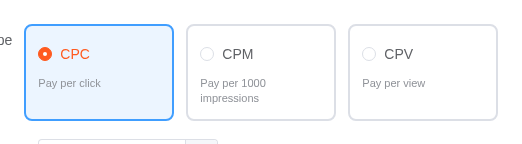
The pricing model is set per campaign, in the Bid & budget section of the new-campaign page. All ads in the campaign bill the same way.
| Model | Billed on | Bid means | Range | Default |
|---|---|---|---|---|
| CPC | Each click | $ per click | $0.005 – $50 | $0.05 |
| CPM | Per 1,000 impressions | $ per 1,000 impressions | $0.05 – $50 | $1.00 |
| CPA | Each conversion | $ per conversion | $0.10 – $1,000 | $5.00 |
| CPV | Each view | $ per view | $0.0001 – $0.05 (max 4 decimals) | $0.001 |
| CPS | Each sale | % of order value | 1% – 90% | 10% |
CPS is a percentage, not an amount
A CPS bid of 10 means 10% of the order value, not $10. Entering 0.01 here doesn't mean one cent — it means one-hundredth of a percent, which is effectively no bid at all. The console switches the input's unit and range when you change model, and resets the bid to that model's default, precisely because carrying a number across models is always wrong.
Ranges come from the platform, not this page
The console fetches the allowed range for each model from the server, and the server validates against the same source. If a range here ever disagrees with what the console shows you, trust the console.
When you create a campaign yourself, the console offers CPC, CPM and CPV. CPA and CPS additionally require a bound conversion tracker before the campaign will save — see Conversion Tracking.
The bid resolution chain
An ad's base bid prefers the ad's own bid price; when the ad has none, it falls back to the parent campaign's bid. The per-dimension adjustments above are then layered on to produce the effective bid.