
Blacklists
Both sides of the marketplace can refuse the other. Advertisers block the traffic they don't want to appear on; publishers block the ads they don't want to show. Both are enforced automatically, so a blocked pairing simply never competes.
For advertisers
Blacklist in the advertiser console keeps your ads off traffic you don't want to buy.
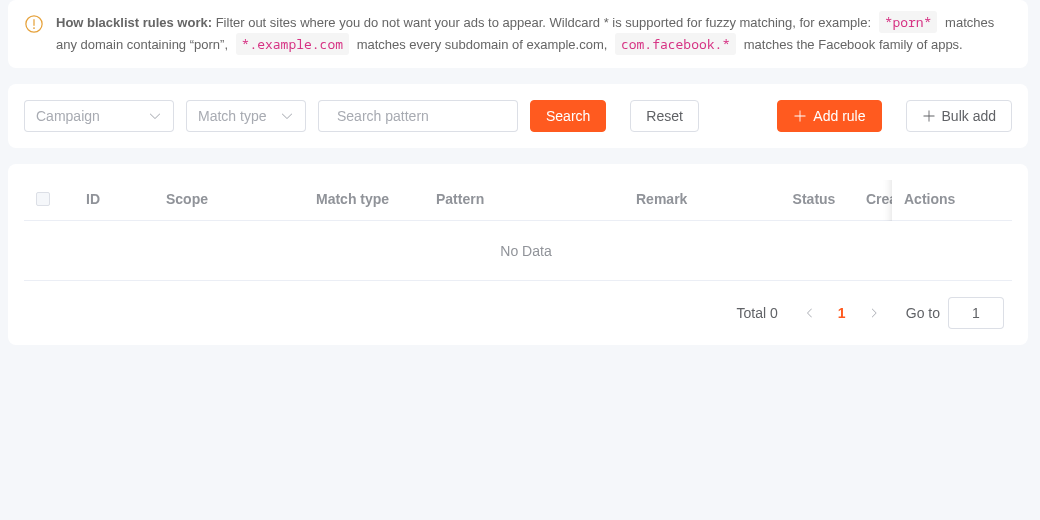
You block by matching a property of the publisher's site, not by picking publishers off a list:
| Match type | Matches against | Example |
|---|---|---|
| Domain | The site's domain | *.example.com |
| Site name | The site's name | *casino* |
| App package | The app's package name | com.example.* |
Patterns support wildcards — * for any run of characters, ? for a single one — and matching is case-insensitive. So *porn* blocks any site whose name contains that substring, wherever it appears.
Scope. A rule is either account-wide (applies to every campaign you run) or scoped to a single campaign. Use account-wide for brand-safety rules you never want to think about again, and per-campaign for one-off exclusions.
Rules can be added one at a time or in bulk, one pattern per line. Each rule can be switched off without deleting it.
Blocking beats targeting
Exclusion always wins. If a zone matches your blacklist, it's dropped even when it satisfies every targeting rule you set. See Targeting & Bidding.
Changes are not instant
A new rule takes effect shortly after you save it, not on the very next ad request.
For publishers
Blacklist in the publisher console keeps ads you don't want off your inventory — competitors, categories you can't run for legal reasons, or a specific advertiser you've had trouble with.
You block by matching a property of the ad:
| Match type | Matches against |
|---|---|
| Advertiser name | The advertiser's company or account name |
| Product name | The product or campaign name |
| App package | The promoted app's package name |
| Domain | The landing page's domain |
The same wildcard rules apply.
Scope is three-tiered, and this is the useful part:
- Set no site and the rule covers your whole account.
- Set a site and it covers that site only.
- Set a site and a zone and it covers that one placement.
So you can ban a category account-wide while allowing an exception on one zone, without maintaining two separate rule sets.
You can also reach a pre-scoped version of this page directly from a site or a zone in their respective lists, which saves setting the scope by hand.
Blocking costs you fill rate
Every rule removes demand from your auctions. Broad wildcards like *loan* can quietly cut revenue on zones you weren't thinking about when you wrote them — especially account-level rules. Scope narrowly where you can.