
AI Creatives
ADBNK can generate creative assets for you from a text prompt — images synchronously, video as a background job. Generated assets land in your media library alongside everything you've uploaded, and are used the same way.
Open it from the AI image / AI video buttons in the media library (Creatives → File library), or from the AI generate button in the Creatives block of the new-campaign page.
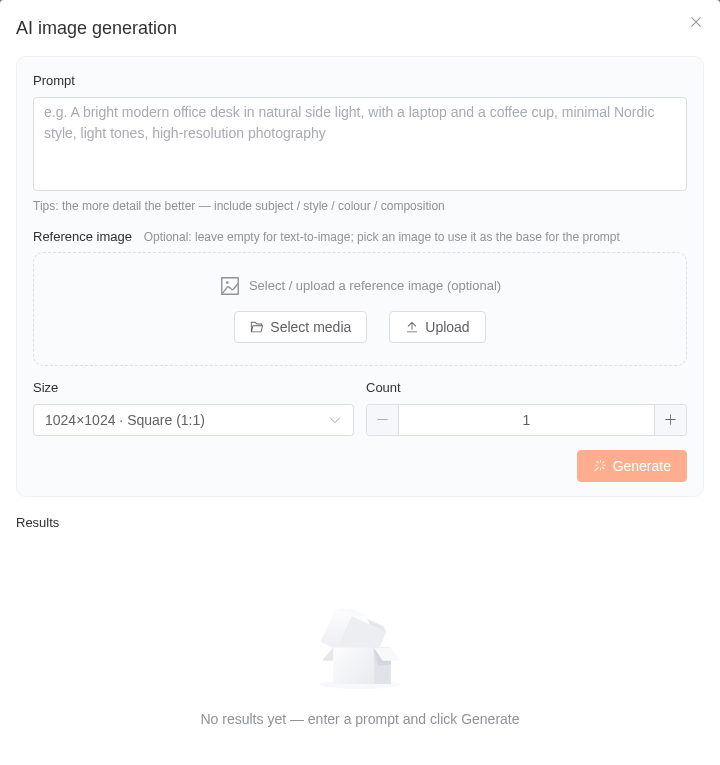
Images
Images are generated synchronously — you write a prompt, wait, and the result appears in the dialog and in your library.
- Prompt — describe what you want. Short prompts produce vague results; the dialog warns you when a prompt is very short.
- Base image (optional) — pick an existing asset from your library to generate from it rather than from scratch.
Video
Video generation is a background job, because it takes minutes rather than seconds. Once you submit, you don't have to sit and wait: close the dialog and come back to the media library later — the finished video is added there.
You can optionally ask for a GIF derived from the video.
Billing and refunds
AI generation is charged against your advertiser balance, per generated image, per submitted video job and per copy request. The price is set by the platform.
Failed jobs are refunded
If a video job can't be submitted, fails, or doesn't finish in time, the charge is automatically refunded to your balance, in exactly the amount that was charged. Image generation is refunded the same way if it fails.
Generated assets still need review
Every AI-generated asset enters your library as pending review, exactly like an upload. It won't serve until the platform approves it. Generating an asset is not the same as being able to run it — leave time for review.
Related reading
- Media Library
- Template Ads — drop generated images straight into a template
- Responsive Ads